
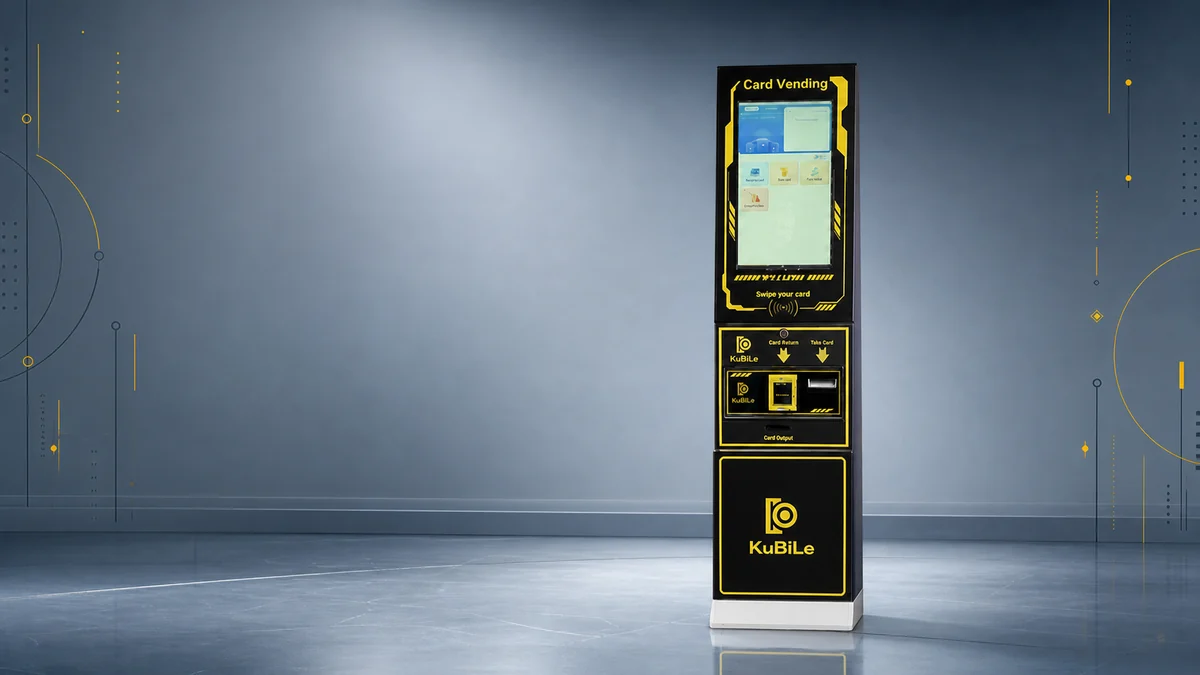
Arcade Self-Service Kiosk Buying Guide
By Kubile Marketing Team
Updated:
Choosing an arcade self-service kiosk starts with the transaction it needs to complete—not simply its screen size or cabinet appearance.
A kiosk that issues new player cards, a machine that recharges existing cards, and a token vending machine may all stand near the entrance to an arcade or family entertainment center (FEC). However, their card mechanisms, payment components, software connections and operating requirements can be very different.
If your venue is evaluating card issuing or recharge equipment, start by reviewing the available arcade self-service kiosk solutions and then define the exact customer transaction the machine must complete.
This buying guide explains how to compare an FEC self-service kiosk by card functions, payment inputs, system compatibility, capacity, installation and daily operation.
Every arcade project has different card standards, payment methods and system requirements. This guide focuses on the questions buyers should confirm before selecting a kiosk, so specifications can be compared with the venue’s actual operating needs.
What Is an Arcade Self-Service Kiosk?
An arcade self-service kiosk is a customer-operated terminal configured to complete one or more venue transactions.
Depending on the selected machine and project, these transactions may include:
- Issuing a new membership card
- Adding value to an existing card
- Accepting a supported payment method
- Dispensing another configured output
- Displaying transaction instructions and results
The phrase “self-service kiosk” does not describe one universal configuration. Two cabinets may look similar while using different card technologies, payment components, system connections or customer workflows.
Before discussing a model, write down exactly what the customer will provide, what the kiosk must do and what the customer must receive.
How Does an Arcade Self-Service Kiosk Work?
A typical transaction can be divided into six stages:
- Identify the customer: Is the user buying a new card or recharging an existing card?
- Select the service: What transaction options can the customer choose?
- Accept the input: What payment method or account credential is required?
- Complete the system action: What information must be written to or associated with the card?
- Deliver the result: Is a new card dispensed, an existing card updated or another output provided?
- Handle exceptions: What happens when payment succeeds but the requested output cannot be completed?
Mapping these stages helps separate the customer-facing workflow from the hardware and software needed behind it. It also gives the kiosk supplier and card-system provider a testable definition of a successful transaction.
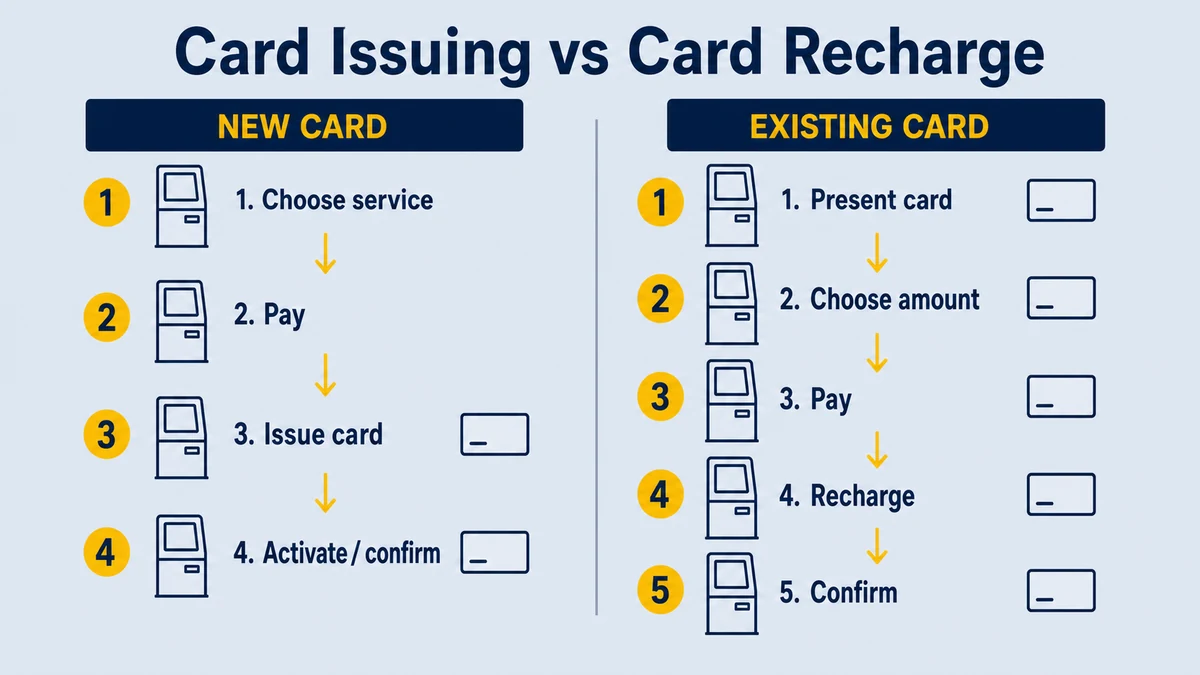
Card Issuing, Recharge, Top-Up and Reload Requirements
Card issuing and card recharge are related, but they are not the same function.
Issuing a New Card
A card issuing kiosk normally needs:
- A suitable card storage mechanism
- A card dispensing mechanism
- A defined card orientation
- A process for preparing or activating the new card
- A way to confirm that the card has been issued successfully
The machine must be evaluated with the exact card intended for the project. Card dimensions, thickness, material and physical condition can affect the dispensing setup.
Recharging an Existing Card
Card recharge—also described as card top-up or reload—requires the kiosk to recognize an existing card and complete the configured value-loading workflow.
The project team must define:
- How the kiosk reads the existing card
- What account or value is being updated
- How the recharge amount is selected
- How payment approval is communicated
- How the updated result is confirmed
- What happens when the card cannot be recognized
Supporting Both Functions
A kiosk that sells new cards and recharges existing cards needs clearly separated customer workflows. The interface should prevent customers from confusing a new-card purchase with an existing-card reload.
Kubile’s MZ-160 Card Vending Machine is one example of a machine configured to sell and recharge chip membership cards.
However, this does not mean that it automatically supports every chip card or arcade card system. The exact card standard, protocol and integration requirements must be confirmed for each project.
Arcade Kiosk Payment Options
An arcade payment kiosk may be requested to accept cash, bank cards, QR payments or other local payment methods. Each option involves different components and responsibilities.
Payment requirements should be defined for the destination country and operating environment.
Cash Payments
For cash input, confirm:
- Destination currency
- Accepted denominations
- Selected bill or coin validator
- Cash storage and collection process
- What happens when the machine cannot complete the requested output
Bank Card and Mobile Payments
A bank card or mobile payment project can involve:
- Payment terminal
- Payment provider or acquiring route
- Software connection
- Network access
- Local configuration and compliance requirements
- Transaction-result communication between the terminal and kiosk
QR Payments
“Support QR payment” is not a complete technical requirement.
The project should identify:
- Target country
- Named QR payment provider
- Required terminal or scanning method
- Communication interface
- Party responsible for integration
- Test environment
- Approval, decline and interruption handling
For every payment method, establish who supplies the component, who performs the integration and who approves the final transaction test.
If your venue instead needs to accept payment and dispense physical tokens, review Kubile’s token vending machine range.
Verify Arcade Card System Compatibility
A card vending machine is one part of a larger transaction environment. It may need to communicate with the venue’s membership card, database, management software or another connected system.
Arcade card system compatibility should be established through exact technical requirements—not a broad statement such as “works with most systems.”
Ask the relevant system provider to confirm:
- Card type and physical format
- Chip or data technology
- Required reader, writer or encoder
- Communication method between the kiosk and system
- Data fields required for new-card issuing
- Data fields required for card recharge
- Network, server, API or local software requirements
- Test cards and integration materials
- Acceptance-test cases
- Party responsible for final technical approval
If these items are unknown, treat system integration as unresolved. Selecting a cabinet or payment component does not prove compatibility with the intended card system.
Plan Card Capacity Around Peak Demand
Card capacity should be evaluated against the venue’s busiest periods and staff workflow.
A nominal capacity number is useful only when it supports the expected number of new-card transactions and the available refill schedule.
Estimate:
- New cards issued during the busiest hour or session
- Number of peak sessions between staff inspections
- Practical refill interval
- Reserve needed for weekends, promotions or seasonal demand
- Number of recharge-only transactions that do not consume a new card
Issuing demand and recharge demand should be measured separately.
Also define how staff will load cards, confirm card orientation, clear a card-feed problem and verify that the next card can be issued correctly.
Plan the Customer Interface Before Finalizing the Cabinet
The customer interface should make each transaction understandable before payment.
Customers should be able to distinguish between:
- Buying a new card
- Recharging an existing card
- Selecting a recharge or purchase amount
- Confirming a payment
- Receiving a card or transaction result
- Requesting assistance
For an international venue, confirm the required languages and local terminology.
The interface should also define what happens when:
- The customer stops using the kiosk
- A transaction is cancelled
- Card stock is unavailable
- An existing card cannot be read
- Payment is declined
- Payment is interrupted
- Payment succeeds but the output cannot be completed
- Network or system communication is unavailable
These states are part of the purchasing requirement. They should not be left until installation.
Check Placement, Access, Power and Connectivity
Measure more than the visible cabinet footprint.
Record the available width, depth and height, then allow space for:
- Opening service doors
- Loading cards
- Collecting cash
- Reaching payment components
- Ventilation
- Cleaning
- Maintenance
- Customer approach and screen viewing
Before ordering, confirm:
- Intended installation environment
- Floor condition and fixing requirements
- Input voltage
- Local electrical requirements
- Wired or wireless network availability
- Distance from the service counter
- Staff response plan when assistance is needed
The most convenient position for customers is not always the easiest position for staff to service. Review both workflows on the venue floor plan.
Define Operator Access and Exception Handling
A self-service transaction still needs an operator process.
Ask how authorized staff will reach:
- Card storage and dispensing mechanisms
- Bill or coin acceptors
- Payment terminals
- Receipt supplies, if included
- Network and computing components
- Areas that may require cleaning or adjustment
Document who responds when card stock is empty, a card cannot be read or dispensed, payment is interrupted, or the kiosk loses network access. The response should cover customer communication, transaction records and service access.
The procedure depends on the selected card system and payment arrangement. Agree it during configuration and include the main failure cases in acceptance testing.
How to Choose an Arcade Self-Service Kiosk for Your FEC
Use the following checklist before comparing quotations.
| Decision area | What to confirm |
|---|---|
| Venue | Arcade, FEC or other amusement venue; expected users and operating hours |
| Transaction | New-card issue, existing-card recharge or another exact workflow |
| Card | Dimensions, technology, read/write method, activation and card-system owner |
| Payments | Country, currency, denominations, provider, terminal and integration responsibility |
| Interface | Languages, service choices, amounts, confirmation messages and error states |
| Capacity | Peak new-card demand, refill interval, reserve and card-loading procedure |
| Installation | Footprint, access clearances, voltage, network and intended environment |
| Operation | Staff access, card loading, cash collection, cleaning and exception handling |
| Testing | Test cards, test payments, failure cases, responsible parties and acceptance criteria |
| Project terms | Quantity, destination, required date, documentation and quotation terms |
A useful supplier quotation should respond to this project definition. It should not rely only on cabinet photographs or a general feature list.
Product Example: MZ-160 Card Vending Machine
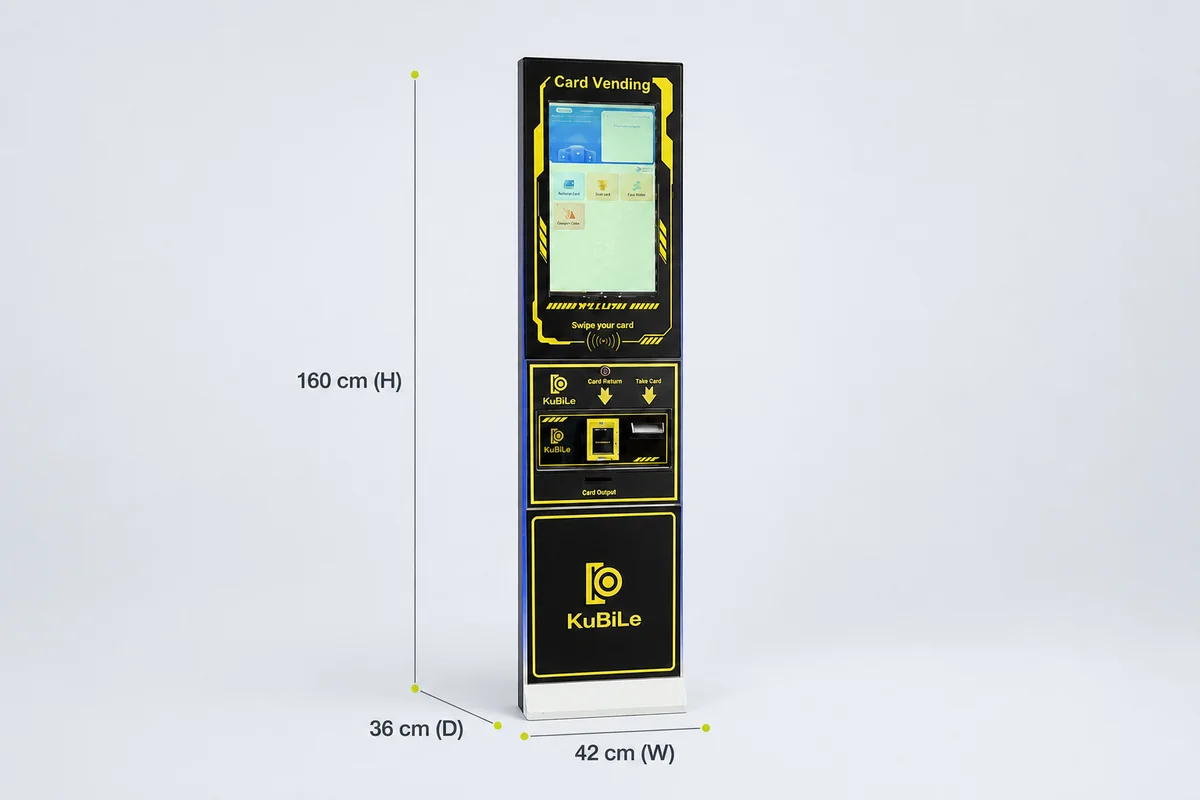
The MZ-160 Card Vending Machine is a card vending machine that sells and recharges chip membership cards.
Its product page lists:
- 22-inch touch screen
- BTC bill acceptor
- Dimensions: 42 × 36 × 160 cm (W × D × H)
- Weight: 50 kg
- Power: 60 W
- Input voltage: 110–240 V
This configuration is not universal.
The exact chip or card standard and protocol remain project-specific requirements. Use the product page to review the listed specifications, then provide the intended card system, payment methods and transaction workflow for configuration discussion.
Card Vending Kiosk or Token Vending Machine?
Choose the machine by defining what the venue’s games accept and what the customer must receive.
| Option | Best fit | Confirm before ordering |
|---|---|---|
| Card vending kiosk | Venues where customers buy or reload membership or stored-value cards | Card technology, system integration and customer workflow |
| Token vending machine | Venues where games accept physical tokens | Token size, payout rules and machine capacity |
| Both | Venues operating separate card and token transactions | Separate workflows and staff procedures for each system |
For token-specific selection factors, read How to Choose a Token Changer for Your Arcade.
Questions to Send Before Requesting a Quote
- What type of venue is this, and which country and currency will it use?
- Should the kiosk issue new cards, recharge existing cards or do both?
- What exact card technology and card system must it support?
- Which payment providers are required, and who is responsible for integration?
- What card capacity is needed for the busiest operating period?
- Which languages, installation space, voltage and network access are required?
- Which payment, card and network failure cases must be tested?
- How many units are required, and what is the target schedule?
Frequently Asked Questions
Can one arcade kiosk both sell and recharge membership cards?
Some configured machines can support both workflows. The exact card technology, system connection and transaction logic must still be confirmed.
Support for card dispensing alone does not prove recharge compatibility.
Is card recharge the same as card top-up or reload?
The terms are often used for a similar customer action: adding value or credits to an existing card. The underlying technical process depends on the card and management system.
Can an arcade self-service kiosk accept cash, bank cards and QR payments?
Available payment inputs depend on the selected model, components, destination market, provider and integration scope.
Confirm each required method for the exact project and define who is responsible for integration and payment testing.
How should I choose the card capacity?
Estimate new-card issues during the busiest period, decide how often staff can refill the kiosk and include a practical reserve.
Recharge-only transactions should be counted separately because they may not consume new cards.
Does a card vending machine work with every arcade management system?
No universal compatibility should be assumed.
Confirm the card technology, interface, data exchange, system owner, integration materials and acceptance tests before ordering.
What information does a kiosk supplier need first?
Start with the venue, destination country, customer transaction, card system, payment inputs, capacity, installation space, voltage, languages, quantity and required schedule.
Define the Transaction Before Selecting the Kiosk
The strongest arcade self-service kiosk specification begins with the customer transaction and works backward to the card mechanism, payment component, software connection, cabinet and service workflow.
This approach makes supplier comparisons clearer and creates testable acceptance criteria for the completed project.
Review the complete Kubile product catalog, learn more about Kubile, or send your kiosk requirements to Kubile to discuss a card vending, recharge or another self-service workflow.